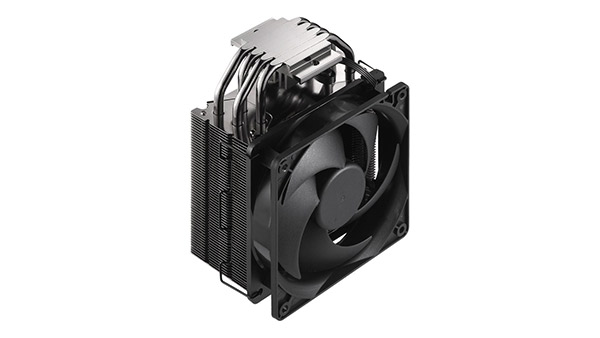
What Do the Heatsink and Fan Do in a Computer? Functions, Differences, and Cooling Principles
KINGKA
What do the heatsink and fan do in a computer? A heatsink absorbs and transfers heat away from electronic components such as the CPU and GPU, while a fan moves air across the heatsink to remove that heat more efficiently. Together, they form an essential part of a computer's cooling system, helping maintain stable operating temperatures, prevent overheating, and support reliable performance.
Although heatsinks and cooling fans are often installed together, they perform different functions. Understanding how these components work can help computer users, system engineers, and equipment manufacturers select appropriate thermal management solutions.
In this guide, we explain the functions of heatsinks and fans, how they work together, the differences between passive and active cooling, and the factors that influence computer cooling efficiency.
What Is the Function of a Heatsink in a Computer?
A heatsink is a thermal management component designed to transfer heat from an electronic device to its surrounding environment.
Inside a computer, processors, graphics cards, voltage regulators, and other semiconductor devices generate heat during operation. If this heat is not removed effectively, component temperatures can increase beyond their intended operating ranges.
A heatsink helps manage this heat by conducting thermal energy away from the electronic component and transferring it into the surrounding air.
How Does a Heatsink Work?
A typical computer heatsink includes a metal base and multiple cooling fins.
The base provides a thermal contact surface, while the fins increase the exposed surface area available for heat transfer.
The heat transfer process generally follows these steps:
Heat generation: The CPU or another electronic component produces heat during operation.
Heat conduction: Thermal energy travels through the component package and thermal interface material into the heatsink base.
Heat distribution: Heat spreads from the base into the heatsink fins.
Heat dissipation: The fin surfaces transfer heat to the surrounding air through convection, with radiation also contributing.
The effectiveness of this process depends on the heatsink material, contact quality, surface area, fin geometry, and airflow conditions.
Why Do Heatsinks Have Fins?
Cooling fins increase the available surface area for heat exchange.
Compared with a flat metal plate, a properly designed finned heatsink can expose substantially more metal surface to the surrounding air.
However, adding more fins does not always improve cooling performance.
If the fins are positioned too closely together, airflow resistance may increase, reducing the amount of air passing through the heatsink.
Therefore, effective heatsink design requires a balance between:
Fin thickness and spacing
Fin height and surface area
Base thickness and heat spreading
Material thermal conductivity
Airflow direction and pressure drop
For industrial computers and other electronic equipment, these parameters are often optimized according to the available installation space and cooling requirements.
What Is the Function of a Fan in a Computer?
A computer cooling fan moves air through or around electronic components to improve heat removal.
Unlike a heatsink, which conducts and distributes thermal energy, a fan primarily generates airflow.
The airflow transports heated air away from cooling surfaces and replaces it with cooler air.
This process is known as forced convection.
How Does a Cooling Fan Work?
A computer fan uses an electric motor to rotate its blades, creating a pressure difference that drives airflow.
Depending on its installation, a fan can draw cooler air into the computer, direct air through a heatsink, or exhaust heated air from the enclosure.
Common computer fan applications include:
CPU Cooling Fans
These fans move air through CPU heatsink fins to dissipate processor heat.
GPU Cooling Fans
Graphics card fans help remove heat from GPU heatsinks, memory components, and associated power electronics.
Case Fans
Computer case fans support the overall movement of air through the enclosure, helping reduce internal temperatures and remove accumulated heat.
Power Supply Fans
Power supply fans help cool internal power conversion components.
The required fan configuration depends on the computer enclosure, thermal load, and airflow restrictions.
Why Is Airflow Important for Computer Cooling?
Even a well-designed heatsink may perform poorly if heated air remains trapped around its fins.
Airflow removes warm air from the heatsink surface and replaces it with air at a lower temperature.
This increases the temperature difference driving heat transfer and can improve the overall cooling performance.
However, actual cooling effectiveness depends not only on fan speed but also on airflow direction, static pressure, heatsink geometry, and chassis ventilation.
Heatsink vs Fan: What Is the Difference?
Although heatsinks and fans are closely related, they are not interchangeable.
A heatsink provides a thermally conductive structure and heat exchange surface. A fan creates airflow to enhance the removal of heat from that structure.
Comparison
Heatsink
Cooling Fan
Primary function
Conducts, spreads, and dissipates heat
Generates airflow to transport heat away
Operating principle
Thermal conduction and convection
Forced airflow
Main materials
Aluminum, copper, or combinations
Plastic or metal blades, motor components
Power consumption
None for a conventional passive heatsink
Requires electrical power
Moving parts
No
Yes
Noise generation
Silent by itself
Produces operating noise
Maintenance
Cleaning and contact inspection
Cleaning and possible replacement
Typical applications
CPU, GPU, power electronics
CPU cooling, GPU cooling, chassis ventilation
The most important distinction is that a fan moves air, while a heatsink provides a path and surface for heat transfer.
In many computer cooling systems, both components are necessary to achieve the required thermal performance.
How Do a Heatsink and Fan Work Together?
A heatsink and fan operate together to transfer heat from a computer processor into the surrounding environment.
In a typical air-cooled CPU assembly, the heatsink is attached to the processor using a suitable mounting mechanism and thermal interface material.
The fan then forces air through or across the heatsink fins.
Step 1: Heat Transfers from the CPU to the Heatsink
When the CPU operates, its internal transistors generate heat.
This heat travels through the processor package toward the heatsink mounting surface.
Thermal paste or another thermal interface material helps fill microscopic gaps between the two surfaces, reducing thermal contact resistance.
Step 2: Heat Spreads Through the Heatsink
The heatsink base absorbs thermal energy from the processor contact area.
Heat then spreads through the metal base and into the attached fins.
The ability to distribute heat effectively depends on the material's thermal conductivity and the geometry of the heatsink.
Step 3: The Fan Moves Air Across the Fins
As the fan operates, air moves through the spaces between the heatsink fins.
The flowing air absorbs heat from the fin surfaces through forced convection.
The fan must provide sufficient airflow against the resistance of the heatsink and surrounding enclosure.
Step 4: Warm Air Leaves the Computer
The heated air must be transported away from the processor area and eventually exhausted from the computer enclosure.
Without adequate chassis ventilation, warm air may circulate back through the heatsink and reduce cooling efficiency.
An effective cooling system therefore considers both local processor cooling and the overall enclosure airflow path.
Why Are Heatsinks and Fans Important in a Computer?
Computer cooling systems influence processor performance, hardware reliability, and operating stability.
1. Preventing Excessive Temperatures
Processors and other electronic components operate within specified temperature limits.
A suitable cooling system helps dissipate generated heat and maintain temperatures within the intended operating range.
2. Reducing Thermal Throttling
Modern processors can reduce their operating frequency or power consumption when temperatures approach thermal limits.
This behavior, known as thermal throttling, helps protect the processor but may reduce computing performance.
Effective cooling allows the system to sustain its intended performance more consistently.
3. Improving System Reliability
Repeated exposure to excessive temperatures can increase thermal stress on electronic assemblies.
Maintaining appropriate operating temperatures helps support reliable operation, particularly in equipment designed for continuous use.
4. Supporting Continuous Industrial Operation
Industrial computers, communication equipment, and embedded systems may operate continuously in demanding environments.
These applications often require cooling components designed for specific ambient temperatures, installation orientations, vibration conditions, and long-term service requirements.
For equipment manufacturers, thermal management must be considered during product design rather than treated as a final assembly detail.
Can a Computer Work With Only a Heatsink and No Fan?
Yes. Some computers use passive cooling systems that operate without a dedicated cooling fan.
In passive cooling, heat is transferred from the processor to a heatsink and then released into the surrounding air primarily through natural convection.
Because no fan is used, the heatsink must provide sufficient heat transfer capability under the intended conditions.
Advantages of Passive Cooling
No dedicated fan noise
Reduced maintenance associated with moving parts
No electrical power required by the heatsink itself
Suitable for certain low-power electronic systems
Useful in selected dust-sensitive or enclosed applications when properly engineered
Limitations of Passive Cooling
Passive cooling depends strongly on heatsink surface area, orientation, and surrounding air temperature.
It may require a larger heatsink than a forced-air system designed for the same thermal load.
Passive cooling is commonly considered for low-power embedded computers, industrial controllers, and fanless electronic devices.
However, high-power desktop processors and GPUs typically require more effective thermal management.
For additional information about the risks of operating without adequate CPU cooling, read our guide: Can a CPU Run Without a Heatsink?
What Factors Affect Heatsink and Fan Cooling Efficiency?
An effective computer cooling system requires a suitable combination of heatsink geometry, material selection, fan performance, and enclosure design.
Heatsink Material
Aluminum and copper are two common materials used in computer heatsinks.
Copper generally offers higher thermal conductivity and can improve heat spreading from concentrated heat sources.
Aluminum provides lower weight, competitive cost, and excellent manufacturing flexibility.
The best material depends on the thermal load, weight limitations, and product design.
Fin Geometry
Fin height, thickness, spacing, and orientation influence the available heat exchange area and airflow resistance.
For forced-air cooling, fin channels should be designed to work with the fan's actual operating airflow.
For passive cooling, wider fin spacing may improve natural convection under suitable installation conditions.
Fan Airflow and Static Pressure
Fan airflow is commonly expressed in cubic feet per minute (CFM) or cubic meters per hour.
However, airflow ratings alone do not determine actual cooling performance.
The fan must also generate sufficient static pressure to overcome restrictions created by heatsink fins, filters, ducts, and the equipment enclosure.
Thermal Interface Quality
Poor thermal contact between a processor and its heatsink increases thermal resistance.
Proper mounting pressure, contact flatness, and thermal interface material selection are important for effective heat transfer.
Ambient Temperature
A cooling system becomes less effective when the surrounding air temperature increases, assuming other operating conditions remain unchanged.
Industrial computer heatsinks should therefore be evaluated at the equipment's expected maximum ambient temperature rather than only under room-temperature conditions.
Aluminum Heatsinks for Computer Cooling Applications
Aluminum heatsinks are widely used in computer cooling because they combine thermal performance with lightweight construction and scalable manufacturing.
Different manufacturing technologies can be selected based on the target thermal resistance, available installation space, and production requirements.
An extruded aluminum heatsink is manufactured by forcing aluminum through a die to form a profile with an integrated base and cooling fins.
Extrusion is suitable for producing repeatable heatsink profiles and can support both natural and forced convection applications.
Typical advantages include:
Integrated base and fin construction
Flexible profile lengths
Cost-effective repeat production
Compatibility with CNC machining
Custom mounting and assembly features
For industrial computer manufacturers, aluminum heat sink extrusion can provide an efficient solution when a consistent profile design is needed across multiple production batches.
A skived fin heat sink is manufactured by cutting and lifting thin fins from a solid metal base.
This manufacturing process enables thin, closely spaced fins while maintaining an integral connection between the fins and the base.
Skived fin heatsinks can provide substantial surface area within a compact footprint, making them useful for selected high-density cooling applications.
However, actual thermal performance must be evaluated together with available airflow and pressure drop.
Extruded vs Skived Fin Heatsinks for Computer Cooling
When designing a computer cooling system, manufacturers may need to choose between different heatsink manufacturing processes.
Design Factor
Extruded Aluminum Heatsink
Skived Fin Heatsink
Manufacturing method
Aluminum extrusion
Precision fin skiving
Typical materials
Aluminum alloys
Aluminum or copper
Fin density
Limited by extrusion geometry
Can support very thin, dense fins
Tooling
Custom profiles may require an extrusion die
No profile extrusion die required
Production suitability
Economical for repeat profile production
Suitable for specialized fin structures
Design flexibility
Profile-based customization
Flexible fin thickness and pitch
Typical cooling use
General industrial and electronic cooling
Compact or high-density cooling systems
Neither manufacturing method is universally superior.
The preferred design depends on heat dissipation requirements, airflow conditions, manufacturing volume, and mechanical constraints.
How to Select the Right Heatsink and Fan for an Industrial Computer
For OEM manufacturers developing industrial computers or electronic systems, cooling component selection should begin with the actual operating requirements.
1. Identify the Heat Load
Determine the expected sustained and peak heat dissipation of the processor and other components.
Thermal design power can provide an initial reference, but actual operating power should also be evaluated.
2. Define Temperature Requirements
Identify the maximum permitted component temperatures and the equipment's expected ambient operating temperature range.
Thermal performance should be evaluated under representative worst-case conditions.
3. Determine the Available Cooling Space
Review the available heatsink dimensions, mounting structure, component clearances, and airflow path.
Compact designs may require different fin structures or cooling approaches compared with larger enclosures.
4. Match the Fan to the Heatsink
The fan's airflow and pressure characteristics should be compatible with the selected heatsink.
A heatsink with very narrow fin channels may require greater static pressure than a more open fin structure.
The fan and heatsink should therefore be evaluated as a combined thermal assembly.
5. Evaluate Manufacturing Requirements
For OEM applications, consider prototype quantities, repeat production volumes, dimensional tolerances, mounting features, and surface finishing requirements.
A custom heatsink manufacturer can help assess which manufacturing process is appropriate for the intended design.
6. Validate the Complete Cooling System
Thermal testing should be performed with the heatsink, fan, processor, enclosure, and other relevant components assembled.
Testing should include representative workloads, ambient temperatures, and fan operating conditions.
This helps identify unexpected airflow restrictions, thermal hotspots, and performance limitations before production.
Custom Heatsink Manufacturing for OEM Computer Cooling
Standard computer cooling components are not always suitable for industrial and specialized electronic equipment.
OEM manufacturers may require heatsinks with non-standard dimensions, specific mounting interfaces, customized fin structures, or unique thermal performance requirements.
A custom heatsink can help integrate cooling directly into the product's mechanical architecture.
KINGKA specializes in the manufacture of thermal management components, including:
Skived Fin Heatsinks: High-density aluminum and copper fin structures.
Custom Heat Sink Components: Precision-manufactured thermal parts for electronic assemblies.
Liquid Cold Plates: Alternative cooling solutions for applications requiring liquid-based thermal management.
These solutions can support industrial computing, telecommunications, power electronics, and other equipment requiring effective heat dissipation.
What Should Buyers Provide When Requesting a Custom Heatsink?
For an OEM heatsink quotation, useful project information includes:
Heat source dimensions and estimated power dissipation
Maximum allowable operating temperature
Ambient temperature range
Available installation dimensions
Fan airflow and pressure characteristics, if applicable
Preferred material and surface finish
CAD drawings and mounting specifications
Prototype and production quantity requirements
Providing these details allows the manufacturer to better evaluate the proposed heatsink geometry and manufacturing process.
Frequently Asked Questions
What do the heatsink and fan do in a computer?
The heatsink transfers heat away from components such as the CPU and GPU, while the fan moves air across cooling surfaces to carry the heat away. Together, they help maintain stable component temperatures.
What is the difference between a CPU fan and a heatsink?
A CPU heatsink is typically a metal component that conducts and dissipates heat. A CPU fan is an electrically powered device that generates airflow to improve heat removal from the heatsink.
Does a heatsink need a fan?
Not always. Some low-power systems use passive heatsinks without fans. Higher-power systems often require forced airflow or other cooling methods to maintain safe operating temperatures.
Can a fan cool a CPU without a heatsink?
A fan alone generally cannot provide adequate cooling for a conventional desktop CPU. Direct airflow does not replace the thermal conduction path and extended heat transfer area provided by a properly mounted heatsink.
Why are aluminum heatsinks commonly used in computers?
Aluminum offers good thermal conductivity, low weight, manufacturing flexibility, and competitive cost. These properties make it suitable for many computer and industrial electronics cooling applications.
Is a bigger heatsink always better?
No. A larger heatsink may offer more surface area, but cooling performance also depends on airflow, fin spacing, material conductivity, contact resistance, and installation conditions.
What happens if a computer cooling fan stops working?
If a cooling fan fails, component temperatures may rise, particularly under heavy workloads. Depending on the system, thermal throttling, warnings, or protective shutdown may occur. The fan should be inspected or replaced as needed.
Can custom heatsinks improve industrial computer cooling?
Yes. Custom heatsinks can be designed around specific heat loads, available space, airflow conditions, and mounting requirements. Proper validation is necessary to confirm their actual thermal performance.
What do the heatsink and fan do in a computer? The heatsink provides a conductive path and expanded surface for heat dissipation, while the fan generates airflow that helps transport heat away from the system.
These components work together to support reliable CPU, GPU, and electronic component operation.
For computer manufacturers and industrial equipment designers, effective cooling requires more than simply selecting a large heatsink or a high-speed fan. Material properties, fin geometry, airflow resistance, thermal interfaces, and enclosure conditions must all be considered.
An appropriately designed cooling solution can help maintain component temperatures, support consistent performance, and improve long-term equipment reliability.
Looking for a Custom Heatsink Manufacturer?
KINGKA provides custom aluminum heatsinks, extruded heatsinks, skived fin heatsinks, and precision thermal management components for OEM and industrial applications.
Whether you are developing an industrial computer, embedded processing system, or other electronic equipment, KINGKA can support your project with customized thermal components based on your drawings and manufacturing requirements.
Contact KINGKA to discuss your custom heatsink project and request a quotation.
Kingka Tech Industrial Limited
We specialize in Heat Sink、Liquid Cold Plate、precision CNC machining and our products are widely used in telecommunication industry, aerospace, automotive, industrial control, power electronics, medical instruments, security electronics, LED lighting and multimedia consumption.