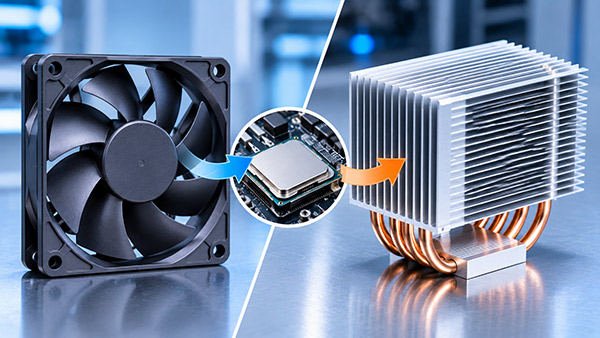
What Is the Difference Between a CPU Fan and a Heat Sink?
KINGKA
What is the difference between a CPU fan and a heat sink? A CPU fan is an electrically powered device that moves air, while a heat sink is a metal component that conducts heat away from the processor and provides a larger surface for heat dissipation. The fan improves airflow, and the heat sink transfers thermal energy from the CPU into that airflow.
The two components perform different but complementary functions. A heat sink can sometimes cool a low-power processor without a dedicated fan, while a fan alone is generally insufficient for cooling a conventional desktop CPU.
Understanding the difference between a CPU fan and a heat sink is important when selecting cooling components for desktop computers, industrial PCs, embedded systems, and OEM electronic equipment.
CPU Fan vs Heat Sink: Key Differences at a Glance
The following comparison highlights the main differences between a CPU cooling fan and a heat sink.
Feature
CPU Fan
CPU Heat Sink
Main function
Moves air to support heat removal
Conducts and dissipates processor heat
Operating principle
Forced airflow
Heat conduction and convection
Typical construction
Motor, blades, frame, bearings
Metal base and cooling fins
Common materials
Plastic, metal, electronic components
Aluminum, copper, or both
Power requirement
Requires electricity
No electrical power required
Moving parts
Yes
No
Noise
Produces mechanical and airflow noise
Silent by itself
Cooling role
Improves convective heat transfer
Provides thermal contact and heat exchange area
Maintenance
Cleaning and eventual replacement
Cleaning and inspection
Customization
Size, speed, airflow, pressure
Material, dimensions, fin structure, mounting features
The key difference: A CPU fan creates airflow, but a CPU heat sink transfers heat away from the processor. Both functions must be considered when designing an effective air-cooling system.
What Is a CPU Heat Sink?
A CPU heat sink is a passive thermal component installed on or connected to the processor to help remove heat generated during operation.
Most conventional CPU heat sinks use aluminum, copper, or combinations of these materials because they offer good thermal conductivity.
A typical CPU heat sink consists of two major structures:
Heat Sink Base
The base makes thermal contact with the processor's heat spreader through a thermal interface material.
Its function is to receive heat from the CPU and distribute that heat into the cooling structure.
Cooling Fins
The fins increase the available surface area for heat transfer into the surrounding air.
Their thickness, height, pitch, and arrangement affect cooling performance.
Why Is Aluminum Commonly Used for CPU Heat Sinks?
Aluminum offers several advantages for electronic cooling:
Good thermal conductivity
Low material density
Cost-effective production
Flexible manufacturing processes
Compatibility with CNC machining
Suitable for customized fin structures
An extruded aluminum heatsink can be manufactured with integrated fins and a base, making it suitable for repeat production and a wide range of industrial cooling applications.
For more specialized designs, aluminum can also be processed using skiving and other precision manufacturing methods.
What Is a CPU Fan?
A CPU fan is an active cooling component designed to move air through or around the processor's cooling assembly.
The fan does not replace the heat sink's thermal contact with the CPU. Instead, it increases airflow across the heat sink surfaces, helping transfer heat into the air.
Most CPU cooling fans use an electric motor to rotate blades and generate airflow.
Important CPU Fan Specifications
When choosing a CPU fan, several parameters should be evaluated.
Fan Size
Fan dimensions affect mechanical compatibility, possible airflow capacity, and installation requirements.
Common PC fan formats include 80 mm, 92 mm, 120 mm, and 140 mm, although specialized equipment may use different sizes.
Airflow
Airflow indicates the volume of air a fan moves, commonly expressed in CFM or m³/h.
Higher free-air airflow does not necessarily result in better cooling when the fan operates against restrictive heat sink fins.
Static Pressure
Static pressure represents the fan's ability to overcome airflow resistance.
It is particularly important for heat sinks with narrow fin channels or other restrictive airflow paths.
Fan Speed
Rotational speed is usually measured in revolutions per minute (RPM).
Higher fan speed may improve airflow but can also increase noise and power consumption.
Acoustic Performance
Fan noise can be important in office computers, medical equipment, and noise-sensitive industrial environments.
The best fan must balance airflow, pressure, noise, power consumption, and expected service life.
Can a CPU Fan Work Without a Heat Sink?
A fan alone is generally not an adequate substitute for a heat sink on a conventional desktop CPU.
Although direct airflow can remove some heat from the processor package, it cannot normally provide the same conductive heat path and extended surface area as a properly mounted heat sink.
The processor has a relatively small heat transfer area, which limits the effectiveness of direct air cooling.
Without a suitable heat sink, the CPU may rapidly approach its thermal limit, reduce performance, or shut down.
Extrusion is often suitable for industrial computers, electronic controllers, power supplies, and other equipment requiring repeatable thermal components.
How to Choose the Right CPU Cooling Solution for OEM Equipment
For industrial computer manufacturers, choosing between a CPU fan, a passive heat sink, or a complete fan-and-heat-sink assembly requires several engineering decisions.
Step 1: Determine Processor Power Requirements
Identify the processor's sustained power consumption, peak power, and expected workloads.
Processor base power or TDP can be useful references, but the actual thermal load under the intended operating conditions must also be considered.
Step 2: Establish the Thermal Budget
Determine the maximum allowable CPU temperature and the highest expected cooling air temperature.
These parameters help define the allowable temperature rise and the required cooling performance.
Step 3: Evaluate the Available Space
Check the maximum heat sink height, width, length, mounting locations, and surrounding component clearances.
A compact chassis may require a customized cooling structure.
Step 4: Select an Appropriate Heat Sink Geometry
Choose fin dimensions, base thickness, material, and manufacturing process based on the thermal and mechanical requirements.
For example, an extruded aluminum heat sink may be economical for repeat production, while a skived fin design may be useful where dense fins are required.
Step 5: Match the Fan to the Heat Sink
For forced-air cooling, evaluate the fan's pressure-flow curve against the airflow resistance of the heat sink and complete enclosure.
This is more reliable than selecting a fan using only its maximum CFM rating.
Step 6: Validate the Assembly
Test the complete system under representative processor loads, ambient temperatures, and fan operating conditions.
Evaluate component temperatures, fan behavior, acoustic performance, and airflow distribution.
Thermal validation is especially important before committing to high-volume OEM production.
What Should OEM Buyers Ask a Custom CPU Heat Sink Manufacturer?
When sourcing custom heat sinks for industrial computers, buyers should consider both the supplier's manufacturing capabilities and the engineering requirements of the project.
Important questions include:
Can the manufacturer produce the required aluminum or copper heat sink geometry?
Which production process is most suitable for the dimensions and quantities?
Can mounting holes, flatness requirements, and other CNC features be incorporated?
What fin thickness and pitch tolerances can be achieved?
Can prototype samples be manufactured for thermal validation?
What inspection documentation is available?
How will design revisions be managed between prototype and production?
Can the manufacturer support repeat orders with consistent dimensional quality?
Providing the supplier with processor specifications, CAD drawings, thermal requirements, airflow information, and expected annual quantities can improve technical evaluation and quotation accuracy.
Custom CPU Heat Sink Manufacturing Solutions from KINGKA
Standard CPU coolers are primarily designed around common desktop processor platforms.
Industrial computers, embedded electronics, and specialized computing equipment may require different mounting structures, component clearances, or thermal designs.
KINGKA provides customized thermal management components for OEM equipment manufacturers.
Our manufacturing solutions include:
Custom Extruded Aluminum Heat Sinks
Suitable for repeatable aluminum profiles, custom lengths, CNC machining, and application-specific mounting features.
Custom Skived Fin Heat Sinks
Suitable for aluminum or copper structures requiring thin, closely spaced fins and compact cooling geometries.
Precision CNC-Machined Heat Sink Components
Machining services for mounting interfaces, contact surfaces, holes, pockets, and other custom mechanical features.
Liquid Cold Plates
Liquid cooling components for applications where air cooling cannot meet the required thermal performance or integration constraints.
For custom projects, KINGKA can evaluate drawings, material preferences, dimensional requirements, and production volumes to support manufacturability discussions.
Frequently Asked Questions
What is the main difference between a CPU fan and a heat sink?
A CPU fan generates airflow, while a heat sink conducts and dissipates heat from the processor. A fan improves convection, whereas the heat sink provides the thermal conduction path and cooling surface.
Is a CPU fan the same as a heat sink?
No. They are different components, although they are commonly combined into a single CPU air-cooling assembly.
Does a CPU need both a fan and a heat sink?
Many desktop CPUs use both, but some low-power processors can operate with passive heat sinks. Cooling requirements depend on the processor's power and operating conditions.
Can I replace a CPU heat sink without replacing the fan?
Sometimes. A fan can be reused if it is mechanically compatible, operates correctly, and provides suitable airflow and static pressure. Proprietary assemblies may require replacement as a complete unit.
Can a CPU heat sink be used without thermal paste?
A suitable thermal interface material is generally required between conventional desktop CPUs and their heat sinks. Thermal paste is common, but some assemblies use approved pads or other interface solutions.
Is an aluminum or copper heat sink better?
Copper provides higher thermal conductivity, while aluminum offers lower weight and typically lower cost. The best material depends on the thermal load, mechanical requirements, and manufacturing budget.
Does a faster CPU fan always improve cooling?
No. Higher fan speed may improve cooling, but performance also depends on the heat sink design, airflow restrictions, and enclosure ventilation.
What is the difference between an active heat sink and a passive heat sink?
An active heat sink assembly uses forced airflow, usually from a fan. A passive heat sink relies mainly on natural convection and does not require a dedicated fan.
Can a custom aluminum heat sink be used for an industrial CPU?
Yes. Custom aluminum heat sinks can be designed with specific dimensions, fin structures, and mounting features for industrial processors, subject to thermal validation.
What is the difference between a CPU fan and a heat sink? The CPU fan moves air, while the heat sink conducts and dissipates heat. Their functions are different, but they are often combined to maintain reliable processor temperatures.
For conventional computer cooling, the heat sink provides the essential thermal path from the processor, and the fan enhances heat transfer into the surrounding air.
For industrial and OEM applications, selecting a cooling solution requires careful consideration of processor power, ambient temperature, airflow, available space, and manufacturing requirements.
A properly engineered heat sink can improve thermal performance and support the reliable operation of electronic equipment.
Looking for a Custom CPU Heat Sink Manufacturer?
KINGKA specializes in custom aluminum heat sinks, extruded heat sinks, skived fin heat sinks, and precision thermal management components for industrial and electronic applications.
Whether you need a standard profile modified for your equipment or a fully customized heat sink based on engineering drawings, KINGKA can support your manufacturing requirements.
Contact KINGKA to discuss your custom heat sink project and request a quotation.
Kingka Tech Industrial Limited
We specialize in Heat Sink、Liquid Cold Plate、precision CNC machining and our products are widely used in telecommunication industry, aerospace, automotive, industrial control, power electronics, medical instruments, security electronics, LED lighting and multimedia consumption.